Most teams watch traffic, bounce rate and checkout conversion closely. Far fewer look at what happens inside the search box.
Yet a visitor who searches is giving you a valuable signal: they already know what they want and are actively trying to find it. When search fails them, the problem rarely appears as an obvious error. More often, it looks like a quiet exit.
If you are new to AI-powered site search, start with Article 1: Why Most Website Search Experiences Fail Users. Otherwise, here are five signs your website search may be costing you sales, and how to spot each one.
1. Your zero-results rate is higher than you think
A “no results found” page is the clearest sign of lost demand. The visitor told you exactly what they wanted, and your site said it had nothing.
The tricky part is that many zero-result searches are for things you do have. The visitor simply used a different word: “sofa” instead of “couch”, “fees” instead of “charges”, a product nickname instead of the official model name. Baymard’s long-running research has repeatedly found that many major ecommerce sites fail on synonyms and product-type searches, forcing users to guess the site’s own jargon (Baymard).
Check it: In GA4, enable site search tracking under enhanced measurement, then list your top search terms. Search each of the top 50 on your own site and note how many return nothing useful.
2. One typo breaks the whole search
People type quickly, often on a phone, often with one thumb. If “wireles headphnes” returns nothing, most visitors will not retry. They will assume you do not stock it.
Baymard has reported that on 69% of the sites it tested, autocomplete does not handle close misspellings well, which risks misleading users about what the catalogue contains (Baymard).
Check it: Take your ten most popular products or pages. Misspell each by one character and search. Count the failures.
3. Visitors leave straight after searching
A high search exit rate (the share of searches after which the visitor leaves the site) tells you results are appearing but not helping. This often happens when the right page exists but ranks below a dozen weaker matches, or when results show outdated campaign pages and archives.
Check it: In GA4, build an exploration that follows sessions from a search results page to the next event. A high proportion of sessions ending on the results page is a red flag. Compare it against your normal exit rate for context.
4. People search the same thing two or three times
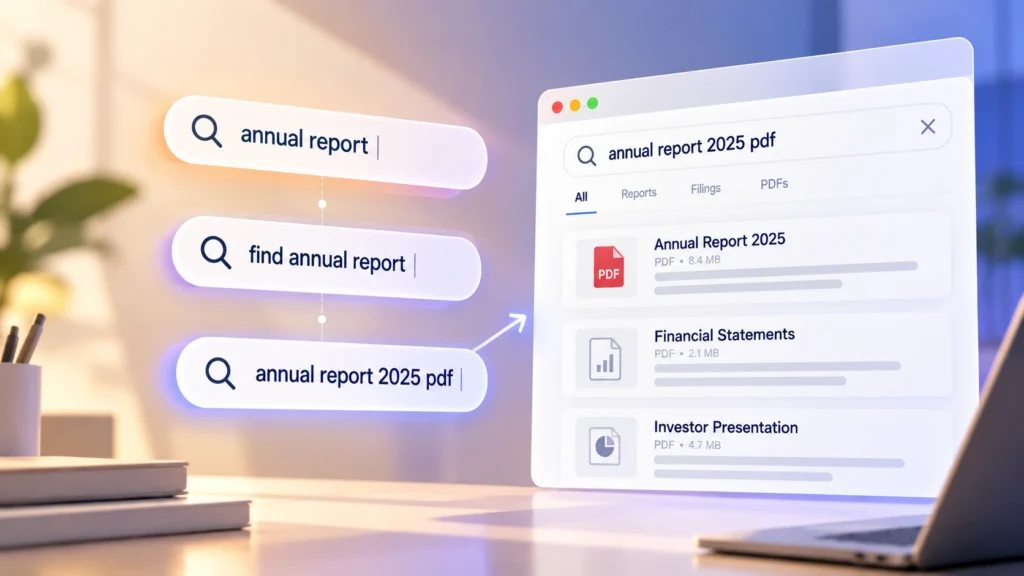
When you see sequences like “annual report” → “find annual report” → “annual report 2025 pdf”, the visitor is reformulating the same request because the first search did not get them where they needed to go. Every extra attempt adds friction.
Repeated refinements can be a sign that search is matching words rather than understanding intent. A visitor asking “where can I find the 2025 annual report?” should not have to know the exact page title, section or filename before they can find it.
Check it: Look for clusters of similar searches within the same session. If visitors keep rewriting the same request in slightly different ways, your search may be making them work too hard to find the answer.
5. Your support inbox is answering questions your website already answers
If customer service keeps replying to “do you deliver to Sentosa?” or “can I change my appointment online?”, and those answers already exist on your site, search is failing silently. Every one of those emails or calls is a cost, and every visitor who did not bother to ask may simply have gone elsewhere.
Check it: Ask your support team for their ten most frequent questions. Type each one, word for word, into your site search. If the answer does not appear in the top three results, that is a fixable gap.
What these signs have in common
These problems usually appear when there is a gap between how your website describes its content and how visitors actually search for it.
Traditional keyword search works well when the query closely matches the words in your product names, page titles or content. It becomes less reliable when visitors use synonyms, make spelling mistakes, ask full questions or describe the same idea differently.
You can compensate with synonym lists, redirects and manually curated results. Those fixes are useful, especially for high-value searches, but they also need ongoing maintenance as your content and visitor behaviour change.
This is where AI-powered search can help. Instead of relying only on exact keyword matches, it can use meaning and context to connect a visitor’s question with relevant content.
How to improve your website search without a major rebuild
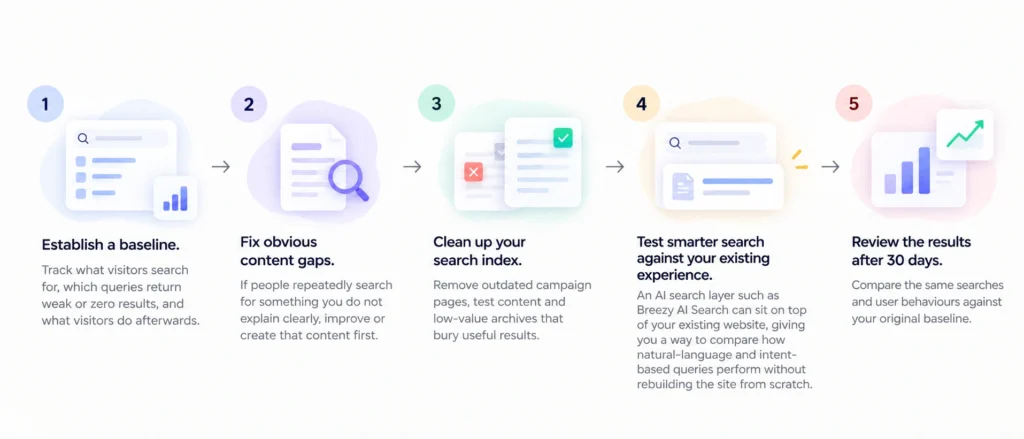
Start with measurement rather than technology.
Establish a baseline. Track what visitors search for, which queries return weak or zero results, and what visitors do afterwards.
Fix obvious content gaps. If people repeatedly search for something you do not explain clearly, improve or create that content first.
Clean up your search index. Remove outdated campaign pages, test content and low-value archives that bury useful results.
Test smarter search against your existing experience. An AI search layer such as Breezy AI Search can sit on top of your existing website, giving you a way to compare how natural-language and intent-based queries perform without rebuilding the site from scratch.
Review the results after 30 days. Compare the same searches and user behaviours against your original baseline.
If you want to see what that implementation looks like in practice, our hands-on review of Breezy AI Search walks through how it works.
FAQ
What is a good zero-results rate for site search?
There is no universal benchmark, as it depends on catalogue size and industry. Track your own rate over time and focus on the high-volume terms that return nothing.
How do I see what people search for on my website?
Enable site search tracking in Google Analytics 4 through enhanced measurement, or use the analytics built into your search tool.
Can bad site search affect SEO?
Not necessarily as a direct ranking factor. But your internal search data can reveal questions, terminology and content gaps that people may also be searching for on Google. Fixing those gaps can improve both the website experience and your organic content strategy.
The bottom line
Your search box is one of the few places where visitors tell you exactly what they are looking for.
Zero-result searches, repeated queries, poor result rankings and support questions are not just UX problems. They are signals of demand your website is failing to meet.
Run the five checks above and establish a baseline. You may find that improving search is less about adding another website feature and more about removing friction between what your visitors ask for and what your website already knows.