Your website has a new kind of visitor
For years, websites were built for people, then made readable for Google. Now there’s a third visitor: AI agents, which don’t just read your site, they try to use it.
Ask an AI assistant to find a supplier or book an appointment, and it may visit sites on your customer’s behalf. If yours is easy to understand, you’re in the running. If not, it moves on.
What does "agent-ready" mean?
An agent-ready site lets an AI agent do three jobs:
- Discover: find your site and the right page on it.
- Understand: read what you offer, where and on what terms.
- Act: complete simple tasks, like an enquiry form.
A simple example
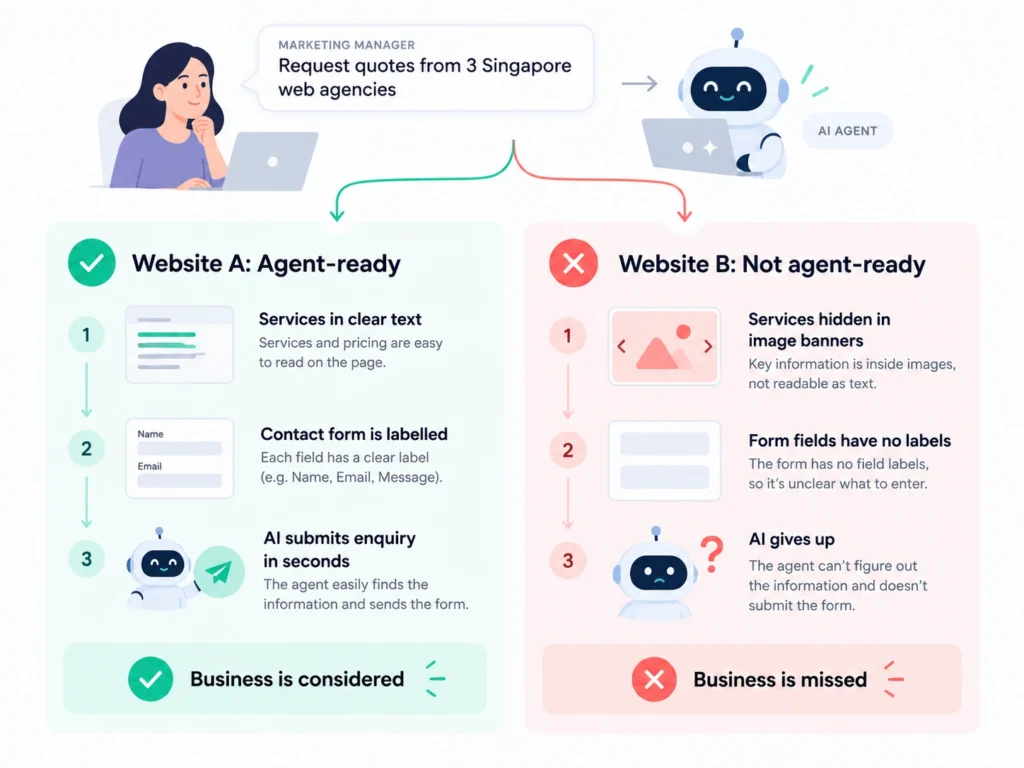
A marketing manager asks an AI agent to request quotes from three Singapore web agencies. On one site, services are clear text and the contact form is labeled, so the agent submits it in seconds. On another, services sit inside image banners and the form has no labels, so the agent gives up. That second business never knows it was considered.
How to make your website agent-ready
- Clear structure: one H1 per page, then logical H2s and H3s.
- Real text: put services, hours and policies in text, not only images or PDFs.
- Descriptive links: “View our WordPress services,” not “Click here.”
- Labeled forms: every field labeled, with clear error messages.
- Structured data: add schema markup (see org) for your organization, services and FAQs.
- Consistent facts: the same address, phone and services everywhere.
- Intentional bot settings: review robots.txt so you only block the AI tools you mean to.
- Smart site search: visitors know what they want, just not your keywords. Breezy AI Search gives direct answers from your own content, with the source, and installs with one line of HTML. See how it works, or try it free for 14 days, no credit card required.
For a deeper content checklist, see How to Make Your Website Content Easier for AI Search to Understand? (GEO Checklist).
The accessibility connection
Screen readers and AI agents rely on the same basics: semantic HTML, labeled forms, descriptive links and alt text. Fixing them helps people with disabilities and AI agents at once. See the W3C’s Web Content Accessibility Guidelines (WCAG), and our take on calmer, clearer design in UX in the Age of AI Fatigue.
Worth watching
Two newer ideas are still early, so treat them as optional: llms.txt, a text file that points AI tools to your key pages, and WebMCP, a proposal for letting browser agents use actions on your site. Support varies, so get the basics right first.
Where to start
- Run an accessibility check on your top five pages.
- Make sure services and contact details are real text.
- Add or review schema markup.
- Ask an AI assistant to describe your business, and note what it gets wrong.
Frequently asked questions
What is an agent-ready website? One that AI agents can find, understand and use, such as reading your services or submitting an enquiry.
Is it the same as SEO? No. SEO helps search engines rank your pages; agent-readiness makes sure AI tools can read and act on them. The two overlap, especially with GEO (Generative Engine Optimization).
Do I need to rebuild my website?
Usually not. Most fixes are to structure, labels and content.
Getting ready for the next visitor
AI agents are becoming another way customers discover, compare and interact with businesses online.
But preparing your website for this shift doesn’t mean starting from scratch. Clear content, logical navigation, accessible forms and well-structured pages are already good practices for your human visitors.
The goal isn’t to redesign your website for AI. It’s to make your website easier for everyone to understand and use.
Thinking about improving your website’s structure and user experience?