There’s a small, invisible moment that happens thousands of times on websites every day. Someone arrives knowing roughly what they want. They spot the search bar. They type a few words — often not the words you’d expect — and hit enter.
What happens in the next two seconds decides whether that person becomes a customer or a closed tab.
We spend enormous energy on how websites look and how they’re structured. We agonise over navigation menus, hero images, and page hierarchy. But the search bar — the tool a large share of visitors reach for first — usually gets built once, wired to whatever the platform offers by default, and never thought about again.
The problem is that the people using it don’t behave the way the people who built it assumed they would.
RAG Search Explained Simply
RAG stands for Retrieval-Augmented Generation, a technique first described by Meta AI researchers in 2020 to make AI answers more accurate and grounded in real sources. If terms like this trip you up, our SEO glossary breaks down the jargon in plain English.
A normal AI chatbot answers from its general training data. A RAG-powered search system works differently, in three steps:
- Retrieve — it searches a specific set of information (your website or knowledge base) for relevant content.
- Augment — it feeds that content to the AI model as context.
- Generate — the model writes a natural-language answer based on what it just found, not just what it was trained on.
For example, if a customer asks “Can I cancel my booking after payment?” — a normal keyword search might return several pages containing the words “cancel,” “booking,” and “payment,” and leave the customer to read through them. RAG search does more: it finds the relevant cancellation policy, reads the context, and returns a clear answer based on what that policy actually says.
Traditional search finds pages. RAG search delivers answers.
RAG Search vs Traditional Website Search
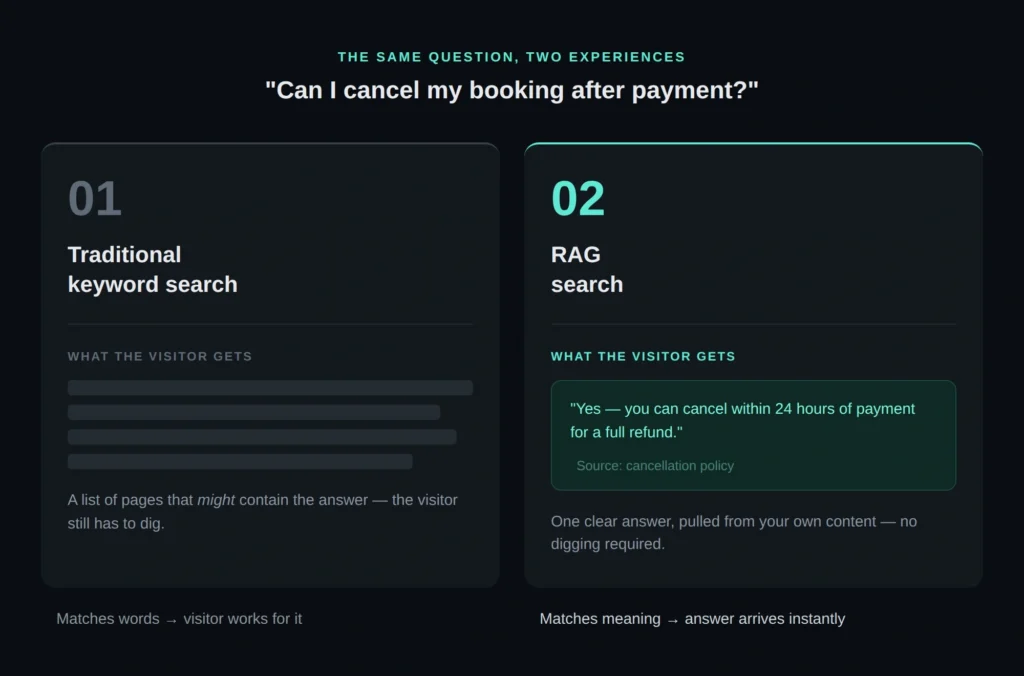
Say your site has a page titled “Refund Policy,” and a user searches “Can I get my money back?” The words don’t match, so a basic search may miss the best result entirely. RAG handles this because its retrieval step relies on semantic search — matching by meaning rather than exact words. It recognises that “get my money back” and “refund” are the same idea, pulls the right policy, and answers from it.
This is what makes RAG search especially valuable for content-rich websites: FAQs, service pages, product documentation, help centres, and knowledge bases — anywhere the right answer is often buried on a page the user would never have found by keyword alone.
How RAG Search Works
RAG search is only as good as the content it has to retrieve. When a visitor asks something your content doesn’t actually cover, the system faces a real choice — and how it’s built determines what happens next.
A well-built implementation recognises when retrieval comes back empty or weak, and says so plainly: pointing the visitor to a human, a contact form, or related content instead of guessing. A poorly built one does the opposite — it hands the model a thin or irrelevant chunk anyway, and the model, doing exactly what it’s designed to do, generates a fluent, confident-sounding answer regardless. That’s where hallucination creeps in — not because the AI is malfunctioning, but because it was never given a real answer to ground itself in.
This is why the retrieval step matters more than the generation step. A model can only be as honest as what it’s handed. If your FAQs and policies have gaps, RAG search won’t invent accuracy to fill them — it’ll either surface the gap or, worse, paper over it with something that sounds right but isn’t.
The fix isn’t a smarter model. It’s the same advice as everywhere else in this piece: content worth retrieving, and a system that knows when to admit it came up short.
Why RAG Search Matters
For your visitors, it means less friction — the right answer at the right moment, instead of a list of pages to sift through.
For your business, it means fewer repetitive support questions, better content discovery, and information that finally earns its keep instead of sitting buried in a PDF or an old FAQ — a key piece of building sustainable traffic and growth.
And it matters for SEO and GEO, because search everywhere is becoming answer-led. Content that is clear, well-structured, and easy to retrieve has a far better chance of being understood, summarised, and surfaced — by your own site search, by Google, and by AI tools like ChatGPT and Perplexity.
Frequently Asked Questions
Is RAG search the same as an AI chatbot?
Not quite. A chatbot generates responses from what it learned during training. RAG search adds a retrieval step first, so the response is grounded in your actual, current content rather than general knowledge.
Does RAG search replace the need for good SEO?
No — it depends on it. RAG search can only surface content that’s clear, accurate, and well-structured to begin with. Weak or outdated content will still produce weak or outdated answers.
Can RAG search work alongside my existing site search?
Yes. Most implementations layer semantic retrieval on top of (or instead of) existing keyword search, so you don’t need to rebuild your site to add it.
Final Thoughts
RAG search changes how people find information online. Instead of making them hunt through pages, it retrieves the right content and turns it into a clear, useful answer — but only if your content is worth retrieving.
So start there. If your site has FAQs, service pages, product information, or help articles, review whether the information is clear, accurate, and easy to retrieve. Look at the questions your customers actually ask, and make sure your content answers them directly. Do that, and you improve the experience for your visitors and make your content work harder for AI-powered search, SEO, and GEO.